API Key Configuration Guide
API Key Configuration Guide
This guide teaches you how to configure AI models in Doforu, just like filling out a simple form.
1. Getting to Know the Settings Page
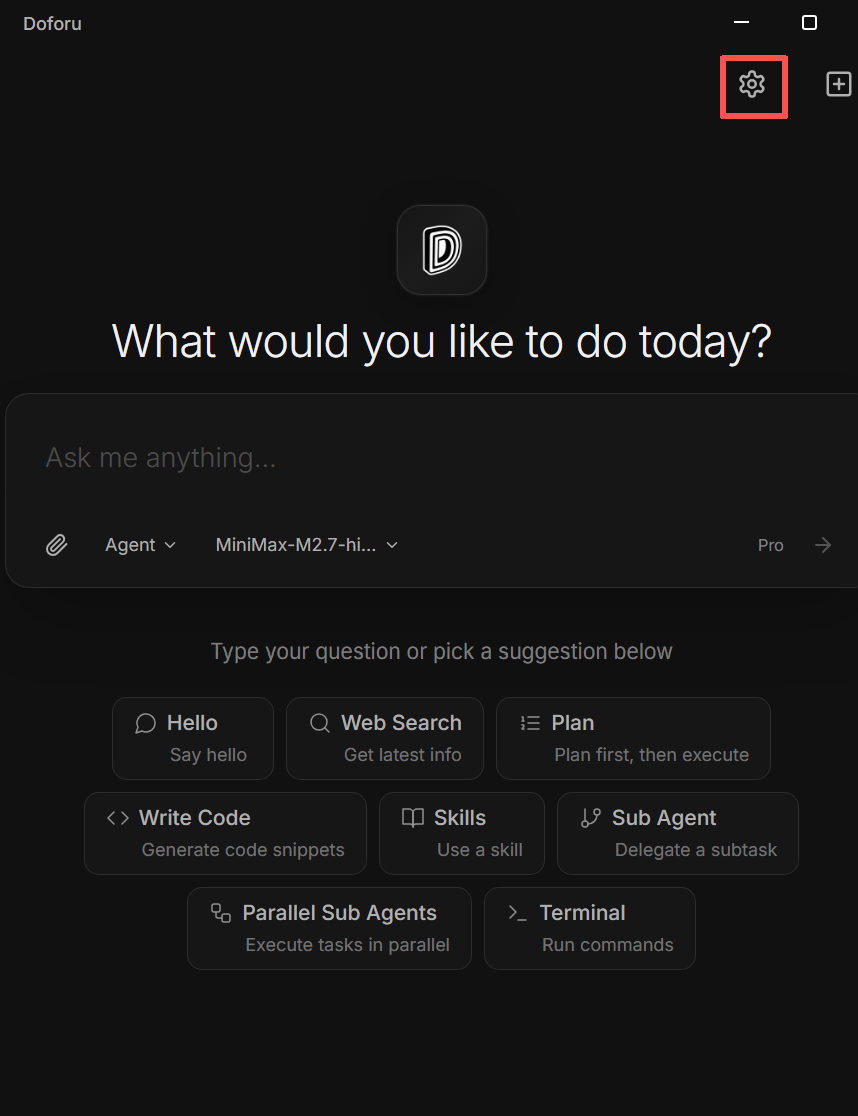
Click the Settings button in the bottom-left corner of the Doforu interface. The settings window will pop up, and by default, you're on the API Key page.
2. Supported Model Providers
Doforu supports OpenAI Compatible and Anthropic Native protocols. Below are all supported AI providers.
OpenAI Compatible Protocol
Works with most AI providers. Select Provider: OpenAI Compatible.
| Provider | Base URL | Models | Cost | Region | Best For | Get Key |
|---|---|---|---|---|---|---|
| OpenAI • GPT-5.5 | api.openai.com/v1 |
gpt-5.5 | $5 / $30 | US | Flagship, strongest model | Get Key |
| OpenAI • GPT-5.4 | api.openai.com/v1 |
gpt-5.4 | $2.50 / $15 | US | Production workhorse, 1M context | Get Key |
| OpenAI • GPT-5.4-Mini | api.openai.com/v1 |
gpt-5.4-mini | $0.75 / $4.50 | US | Budget-friendly general tasks | Get Key |
| OpenAI • o4-mini | api.openai.com/v1 |
o4-mini | $0.55 / $2.20 | US | Budget reasoning, math, logic | Get Key |
| OpenAI • GPT-4.1 | api.openai.com/v1 |
gpt-4.1 | $2 / $8 | US | Reliable long-context production model | Get Key |
| Google Gemini • 2.5 Flash | generativelanguage.googleapis.com/v1beta/openai/ |
gemini-2.5-flash | $0.30 / $2.50 | US | Fast hybrid reasoning, 1M context | Get Key |
| Google Gemini • 2.5 Flash-Lite | generativelanguage.googleapis.com/v1beta/openai/ |
gemini-2.5-flash-lite | $0.10 / $0.40 | US | Most cost-efficient, high volume | Get Key |
| Google Gemini • 3 Flash Preview | generativelanguage.googleapis.com/v1beta/openai/ |
gemini-3-flash-preview | $0.50 / $3.00 | US | Frontier intelligence, fast | Get Key |
| Google Gemini • 3.1 Pro Preview | generativelanguage.googleapis.com/v1beta/openai/ |
gemini-3.1-pro-preview | $2 / $12 | US | Best multimodal, agentic, vibe-coding | Get Key |
| DeepSeek • V4 Flash | api.deepseek.com |
deepseek-v4-flash | $0.14 / $0.28 | CN | Agentic coding, low cost | Get Key |
| DeepSeek • V4 Pro | api.deepseek.com |
deepseek-v4-pro | $1.74 / $3.48 | CN | Maximum capability | Get Key |
| DeepSeek • V3 | api.deepseek.com |
deepseek-v3.2 / deepseek-v3 / deepseek-chat | $0.14 / $0.28 | CN | Stable legacy models, great value | Get Key |
| Anthropic • Claude Sonnet 4.6 | api.anthropic.com/v1 |
claude-sonnet-4.6 / claude-3-5-sonnet-20241022 | $3 / $15 | US | Best balance for production | Get Key |
| Anthropic • Claude Opus 4.7/4.6 | api.anthropic.com/v1 |
claude-opus-4.7 / claude-opus-4.6 | $5 / $25 | US | Best conversation, long context | Get Key |
| Anthropic • Claude Haiku 4.5 | api.anthropic.com/v1 |
claude-haiku-4.5 | $1 / $5 | US | Fast, lightweight tasks | Get Key |
| OpenRouter | openrouter.ai/api/v1 |
owl-alpha / openai/gpt-5.5 / openai/gpt-5.4 / anthropic/claude-opus-4.7 / anthropic/claude-sonnet-4.6 | $2.50 / $10 | US | Aggregates multiple models | Get Key |
| xAI (Grok) | api.x.ai/v1 |
grok-4.3 / grok-4 / grok-4.1-fast | $1.25 / $2.50 | US | Fast reasoning, competitive pricing | Get Key |
| TogetherAI | api.together.xyz/v1 |
meta-llama/Llama-3.3-70B-Instruct / mistralai/Mixtral-8x22B | $0.6 / $1.2 | US | Open source models cloud hosting | Get Key |
| Groq | api.groq.com/openai/v1 |
llama-3.1-70b-versatile / mixtral-8x7b-32768 / nemotron-3-super | $0.2 / $0.4 | US | Ultra-low latency inference (LPU chip) | Get Key |
| Tencent Hunyuan | api.hunyuan.cloud.tencent.com/v1 |
hunyuan-turbos-latest / hunyuan-pro / hunyuan-lite | $0.4 / $1.2 | CN | Tencent ecosystem, strong Chinese language | Get Key |
| StepFun | api.stepfun.com/v1 |
step-3.5-flash | $0.3 / $0.6 | CN | Chinese ecosystem, stable | Get Key |
| MiniMax | api.minimax.chat/v1 |
minimax-m2.7 | $0.2 / $0.4 | CN | Affordable, good performance | Get Key |
| SiliconFlow | api.siliconflow.cn/v1 |
Qwen/Qwen3.5-35B-A3B / DeepSeek-V3.2 / DeepSeek-V4 | $0.99 / $1.99 | CN | Works in China, free credits | Get Key |
| Alibaba Bailian | dashscope.aliyuncs.com/compatible-mode/v1 |
qwen3.7-max / qwen-max / qwen-plus | $0.5 / $2 | CN | Alibaba ecosystem, stable | Get Key |
| Zhipu AI | open.bigmodel.cn/api/paas/v4 |
glm-5.1 / glm-4 / glm-4-flash | $0.1 / $0.3 | CN | Works in China, optimized Chinese | Get Key |
| Moonshot Kimi | api.moonshot.cn/v1 |
moonshot-k2.6 / moonshot-v1-128k | $0.6 / $1.2 | CN | Long context support | Get Key |
| ByteDance Doubao | ark.cn-beijing.volces.com/api/v3 |
doubao-seed-2.0-pro / doubao-pro / doubao-lite | $0.2 / $1 | CN | Affordable and stable | Get Key |
Anthropic Native Protocol
For Claude models. Select Provider: Anthropic Native.
| Provider | Base URL | Models | Cost | Region | Best For | Get Key |
|---|---|---|---|---|---|---|
| Anthropic • Claude Sonnet 4.6 | api.anthropic.com/v1 |
claude-sonnet-4.6 / claude-3-5-sonnet-20241022 | $3 / $15 | US | Best balance for production | Get Key |
| Anthropic • Claude Opus 4.7 | api.anthropic.com/v1 |
claude-opus-4.7 | $5 / $25 | US | Best conversation, long context | Get Key |
| Anthropic • Claude Haiku 4.5 | api.anthropic.com/v1 |
claude-haiku-4.5 | $1 / $5 | US | Fast, lightweight tasks | Get Key |
Note: Anthropic Native protocol does NOT require "OpenAI Compatible" checkbox to be enabled.
OpenRouter (Unified Multi-Model Gateway)
OpenRouter acts as a single API proxy that gives you access to 200+ models from dozens of providers—OpenAI, Anthropic, Google, Meta, DeepSeek, and more—all through one API key. Instead of juggling multiple provider accounts, you configure once and switch models by changing the model ID.
How model IDs work: OpenRouter uses provider/model-name format. For example:
openai/gpt-5.5— OpenAI's GPT-5.5anthropic/claude-sonnet-4.6— Anthropic's Claude Sonnet 4.6google/gemini-2.5-flash— Google's Gemini 2.5 Flashopenai/gpt-5.4— OpenAI's GPT-5.4anthropic/claude-opus-4.7— Anthropic's Claude Opus 4.7meta-llama/llama-3.3-70b-instruct— Meta's Llama 3.3 (via OpenRouter)
Browse all available models at openrouter.ai/models.
Quick setup (4 steps):
- Sign up at openrouter.ai and get your API key
- In Doforu, add a new config with Provider: OpenAI Compatible
- Set Base URL to
https://openrouter.ai/api/v1 - Enter your desired Model ID (e.g.,
openai/gpt-5.5) and your API key
Why choose OpenRouter? One key, one base URL, access to 200+ models. Great for exploring different models without creating multiple provider accounts.
3. Configuration Steps
Step 1: Open Settings
Click the Settings button in the bottom-left corner. Settings modal opens (default: API Key page).
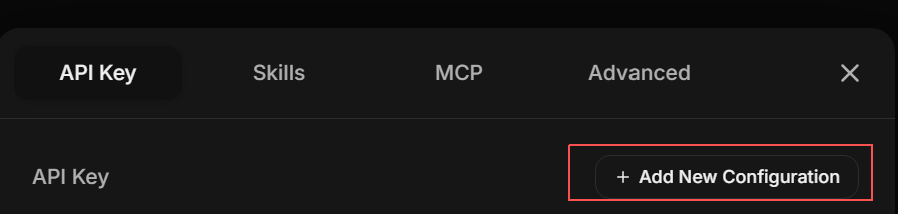
Step 2: Add New Configuration
Click + Add New Config in the top-right corner.
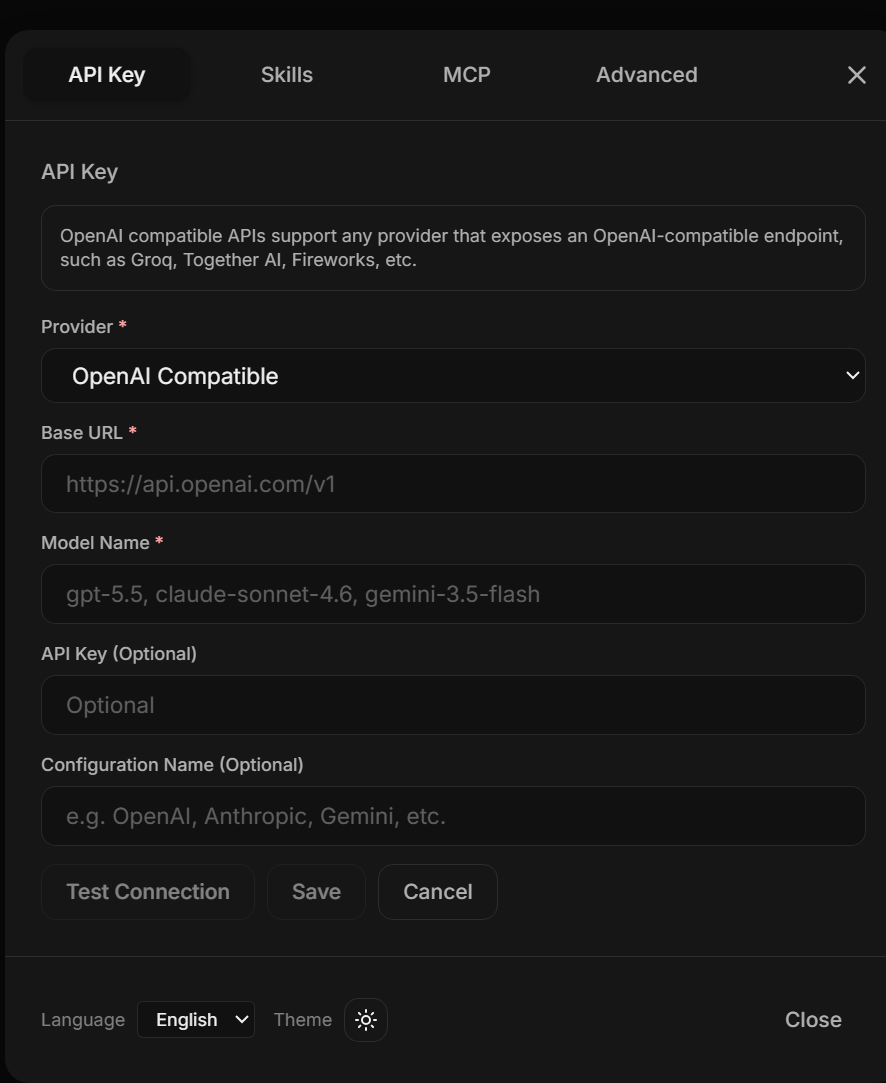
Step 3: Select Provider Protocol
- OpenAI-based models → Select OpenAI Compatible
- Claude models → Select Anthropic Native
Step 4: Fill in Configuration
Copy the corresponding Base URL and Model from the tables above.
Step 5: Paste API Key
Copy your API Key from the provider's website and paste it into the input box.
Step 6: Save Configuration
- Click Test Connection → Wait 2-3 seconds
- Shows green success → Click Save
- Your model will appear in the model selector at the top-right
4. Configuration Templates
Template A: OpenAI Compatible
| Field | Value |
|---|---|
| Provider | OpenAI Compatible |
| Base URL | Provider's Base URL (e.g., https://api.openai.com/v1) |
| Model | Provider's example model (e.g., gpt-5.5) |
| API Key | Your API Key from the provider |
| Config Name | Any name (e.g., "My GPT-5.5") |
Template B: Anthropic Native (Claude only)
| Field | Value |
|---|---|
| Provider | Anthropic Native |
| OpenAI Compatible | Do NOT enable |
| Base URL | https://api.anthropic.com/v1 |
| Model | claude-sonnet-4.6 |
| API Key | Your API Key from Anthropic |
| Config Name | Any name (e.g., "My Claude") |
Template C: OpenRouter (Multi-Provider Gateway)
| Field | Value |
|---|---|
| Provider | OpenAI Compatible |
| Base URL | https://openrouter.ai/api/v1 |
| Model | Provider's model ID (e.g., openai/gpt-5.5) |
| API Key | Your API Key from openrouter.ai/keys |
| Config Name | Any name (e.g., "OpenRouter GPT-5.5") |
5. Connection Test and Troubleshooting

Test Results
| Result | Meaning | Solution |
|---|---|---|
| Green "Connection Success" | Config is correct | Save and use |
| Red "Connection Failed" | Config has errors | Check the following |
Troubleshooting
1. Incorrect Base URL
- Make sure it includes the https:// prefix
- Check for extra/missing slashes /
2. Incorrect API Key
- Make sure you copied it completely (no extra spaces)
- Check if the key is expired or disabled
3. Network Issues
- Some providers require VPN to access
- Check if your proxy is blocking requests
4. Incorrect Model Name
- Confirm the model name matches exactly
- Some providers include version numbers (e.g., gpt-5.5-2026-04-24)
6. FAQ
Q: Can I configure multiple providers at the same time?
A: Yes. Click "Add New Config" to add multiple providers, then switch between them in the model selector.
Q: Which provider is best for beginners?
A: Users in China: SiliconFlow (free credits, works immediately). International users: OpenAI (most popular, strongest models).
Q: Is my API Key secure?
A: Your API Key is stored locally or on your configured server. Doforu does not collect or upload your Key.
Q: How do I choose a model?
A: Recommended starting models:
- gpt-5.5 / gpt-5.4-mini (OpenAI)
- deepseek-chat (DeepSeek - lowest cost)
- glm-4-flash (Zhipu AI - lots of free credits in China)
Q: Should I use OpenRouter or configure each provider separately?
A: If you want to try many different models quickly, start with OpenRouter—one key, one setup, access to 200+ models. If you have heavy production usage and want the absolute lowest cost for a specific provider, configuring that provider directly may be cheaper.